Hello everyone,
We are excited to announce some significant updates to our Odoo for WooCommerce plugin! Based on your feedback, we've added a few features that will greatly enhance its functionality and usability.
-
Multi Language Support: To accommodate our growing international user base, we have expanded our language support. The Odoo plugin is no longer limited to English, making it more accessible for users around the globe (PLUGINS-1865).
-
Invalid URL Correction: Some of our users reported an issue with invalid URLs. We've addressed this in our latest update and corrected the problem, ensuring a smooth and seamless experience with our plugin (PLUGINS-2148).
-
Successful Connection Indicator: We understand the importance of knowing whether your systems are integrated correctly. That's why we've added a visual indicator in the settings to confirm a successful connection between your WooCommerce site and Odoo (PLUGINS-1667).
Using the Successful Connection Indicator:
1. Navigate to https://yoursite.com/wp-admin/admin.php?page=wc-settings&tab=integration§ion=woocommmerce_odoo_integration
2. On the Odoo Settings Page you can see the Odoo Settings Page, the Indicator can be seen on the Odoo Settings Page.
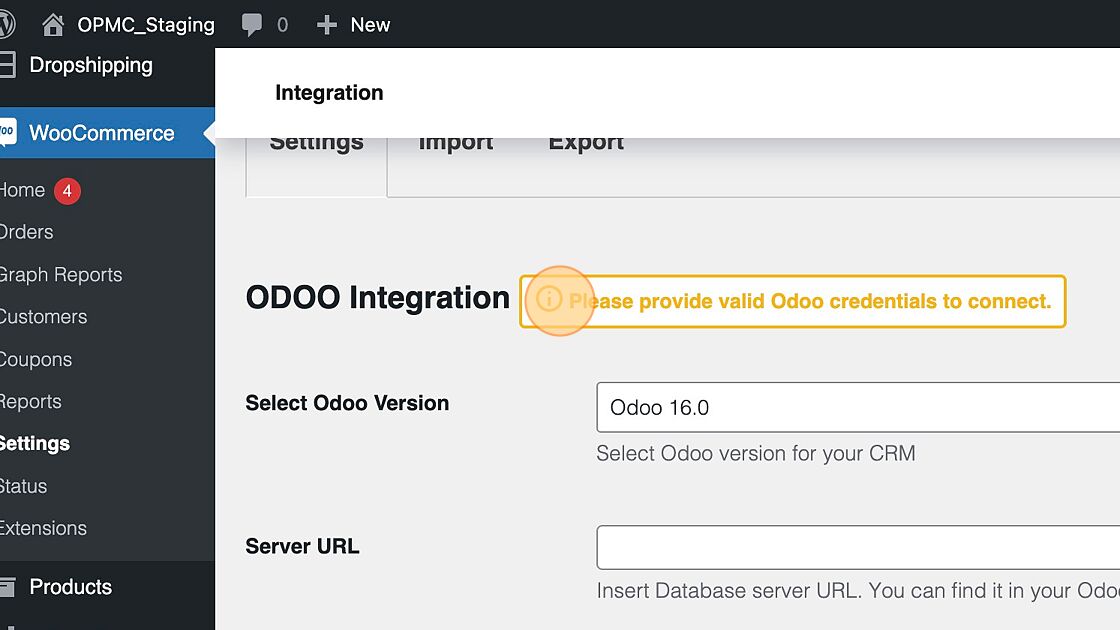
3. Click the "Server URL" field.

4. Click the "Database Name" field to enter the Database Name.

5. Click "Insert username. You can find it in your Odoo account."

6. Click the "Username" field.

7. Click the "Password" field to enter your password.

8. Click "Save changes"

9. Refresh the Page to view the indicator where you can see the updated status: "Odoo Account is Connected"

These updates reflect our commitment to providing you with a product that not only meets but exceeds your expectations. We are continually looking for ways to improve and appreciate your feedback.
Stay tuned for more updates and improvements in the future. Happy selling!
Best,
OPMC Team